iMovie Alternatives for Windows
Top 6 Alternatives to iMovie for Windows
Looking for alternatives to iMovie for Windows? While Apple’s beloved editor isn’t available for Windows, you’re in luck. The right alternative can give you that same quick, fun, and creative editing experience – sometimes with even more power. We’ve tested the top contenders to bring you this definitive list of the best iMovie alternatives for Windows, helping you move from searching to creating.
#1 iMovie Alternative for Windows
Before we dive into the full list, if you want an editor that feels most like iMovie from the moment you open it, our top pick is clear: Movavi Video Editor.
Movavi Video Editor is designed specifically for users who love iMovie’s simplicity but need a Windows solution. Its intuitive, drag-and-drop timeline, one-click magic tools, and built-in media library create an instantly familiar and more capable editing environment.
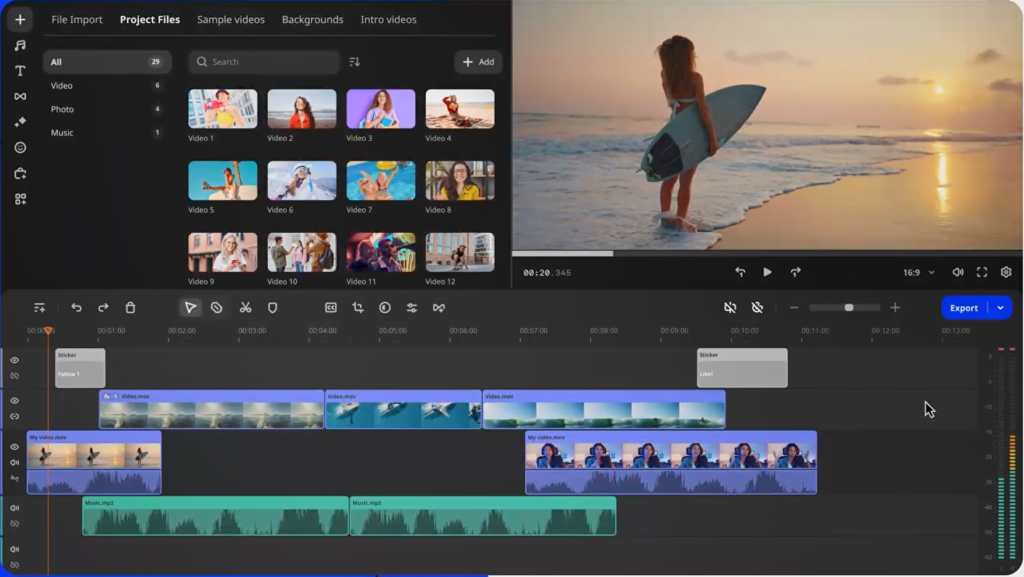
Why it’s the best iMovie alternative for Windows:
Movavi Video Editor is perfect for: Beginners, vloggers, social media creators, students, families, and anyone looking for a powerful yet easy-to-use alternative to iMovie on Windows.
01
iMovie-Like User Interface
Clean, simple, and no technical jargon. Drag and drop to complete tasks.
02
One-Click Enhancements
“Magic Enhance” stabilizes footage, corrects color, and improves quality instantly.
03
All-in-One Media Library
Royalty-free music, sound effects, titles, and transitions built right in.
04
AI-Powered Tools
Effortless background removal, noise cancellation, and style transfer.
05
Perfect for Beginners
Create polished videos for YouTube, TikTok, family memories, or presentations without a learning curve.
06
Share Anywhere
Easily output video and share anywhere you want. Directly upload to YouTube to share with your audiences.
The Complete Comparison: Top 6 iMovie Alternatives
We generated this side-by-side comparison table based key parameters, like clip trimming, visual effects, stabilization, video quality adjustments, sharing options, and other important features.
| iMovie Alternatives | Best For | Key Features | Pros | Cons |
| 1. Movavi Video Editor | Most iMovie-like experience & beginners | Magic Enhance, AI tools, huge media library, easy export | Extremely intuitive, powerful for its simplicity, great support | Paid software (with robust free trial) |
| 2. DaVinci Resolve | Advanced color grading & pro features | Hollywood-grade color tools, Fairlight audio, Fusion VFX | Unbelievably powerful free version, professional results | Steep learning curve, demanding on PC hardware |
| 3. Clipchamp | Quick online edits & Windows 11 users | Built into Win 11, browser-based, templates | Convenient, no install needed, easy sharing | Requires subscription for best assets, internet dependent |
| 4. HitFilm Express | VFX & cinematic storytelling | Robust VFX toolkit, compositing, audio tools | Great blend of editing & VFX, active community | Interface can be complex for pure beginners |
| 5. CapCut | Trendy social media content creators | Vast trendy templates, auto captions, TikTok optimized | Completely free, incredibly fast for social clips | Mobile-centric, can feel limited for long-form projects |
| 6. Shotcut | Open-source enthusiasts & total control | Cross-platform, supports vast format range, no watermarks | 100% free & open-source, highly customizable | Dated interface, less intuitive for quick edits |
In-Depth Look: Why Choose Each Alternative?
#1 iMovie Alternative for the iMovie Purist: Movavi Video Editor
Choose it if: You want to start editing immediately without relearning everything. It captures iMovie’s spirit of easy, drag-and-drop video editing and adds useful extras like motion tracking and green screen without complexity. It’s the best easy video editor for Windows for those prioritizing workflow and results over technical specs.
#2 iMovie Alternative for the Aspiring Pro: DaVinci Resolve
Choose it if: You’re serious about color correction and don’t mind a learning curve. Its free version is unparalleled for professional features, making it the best free professional video editor for Windows. Not for casual users, but a powerhouse for committed creators.
#3 iMovie Alternative for the Convenience-Seeker: Clipchamp
Choose it if: You have Windows 11 and need to make a simple video fast. Its integration is seamless for quick social clips or presentations. Ideal as a basic online video editor, but power users will feel limited.
#4 iMovie Alternative for the Visual Effects Hobbyist: HitFilm Express
Choose it if: You dream of adding lightsabers or explosions to your videos. It’s a fantastic free video editor with VFX that bridges the gap between editing and compositing, though it requires more patience to learn.
#5 iMovie Alternative for the Social Media Specialist: CapCut
Choose it if: Your primary goal is creating content for TikTok, Reels, or Shorts. Its template-driven, trend-focused tools are unbeatable for speed and relevance in the best free video editor for social media category.
#6 iMovie Alternative for the Tinkerer: Shotcut
Choose it if: You value open-source software and total control above all else. It’s a capable free, open-source video editor that rewards those willing to explore its deep menus.
Edit with joy, not struggle. Create with Movavi.
Stop Searching, Start Editing
Your quest for iMovie on Windows doesn’t have to end in frustration. It can end with you finding a tool that might even improve your workflow. For over 90% of users searching for a simple, powerful, and intuitive iMovie replacement, Movavi Video Editor is the most satisfying solution.
PTNAFFDIS010126ALLAFS15 – 15% discount coupon on yearly subscription products, valid till 15th February 2026.
FAQ: Finding Your iMovie for Windows Replacement
Let’s know if you have other questions.
A: No. iMovie is exclusive to Apple devices. Any site offering a “download” is misleading. Your best path is to choose a reputable alternative like those listed above.
A: Movavi Video Editor is consistently rated the easiest for beginners and iMovie users due to its intentional design similarity and guided workflow.
A: DaVinci Resolve is the most powerful free software, but “powerful” comes with complexity. For a balance of power and ease, Movavi’s free trial offers full functionality to test without commitment.
A: For streamlined, easy YouTube editing, Movavi is ideal. It has direct export presets for YouTube and tools tailored for creators. For purely free options, consider CapCut (for short-form) or DaVinci Resolve (if you have time to learn).
